The Heartbeat Endpoint
Logs are great at telling us what happened.
They help us answer questions like:
- did the app start?
- did a request arrive?
- what failed?
- when did it fail?
That is useful.
But sometimes we want to ask a much simpler question:
is the app alive right now?
We should not need to submit a real form, trigger a real route, or wait for a real error just to answer that.
That is where a heartbeat endpoint comes in.
What a Heartbeat Endpoint Is
Section titled “What a Heartbeat Endpoint Is”A heartbeat endpoint is a small route whose only job is to say:
yes, the app is here and responding
That is it.
It is not a user-facing feature. It is not business logic. It is not meant to do anything interesting.
It is an operational signal.
A very tiny one. A very useful one.
The Existing Voyager Health Route
Section titled “The Existing Voyager Health Route”We actually already placed a tiny heartbeat route in Voyagers Log during the initial build.
If you open server/index.js, just before the main API routes, you will see this:
app.get('/api/health', (req, res) => { res.json({ ok: true, service: 'voyagers-log-api' });});If we hit /api/health from the terminal with curl or open it in a browser window, the app returns a tiny JSON object that confirms:
- the Node process is alive
- the Express router is responding
- the app can accept and answer a request right now
That is already a very useful signal.
A heartbeat endpoint is simple on purpose. Its job is not to explain everything about the system. Its job is to answer one fast, important question: is the app up and responding?
Why This Helps
Section titled “Why This Helps”A heartbeat endpoint is useful because it removes ambiguity.
Without it, if we want to check whether the app is still alive, we might end up asking awkward questions like:
- should I hit the homepage?
- should I try a real form submission?
- should I test a database-backed route?
- should I wait for a user to complain?
That is clumsy.
With a dedicated heartbeat endpoint, we get a much cleaner answer.
It lets us quickly distinguish between:
- the app is dead and
- the app is alive, but some deeper feature may be broken
That distinction matters a lot.
What the Heartbeat Does and Does Not Prove
Section titled “What the Heartbeat Does and Does Not Prove”A heartbeat endpoint is intentionally narrow.
If it returns a healthy response, that usually tells us:
- the process is running
- Express is responding
- the route layer is alive
That is helpful.
But it does not automatically prove that:
- the database is reachable
- all routes are functioning
- form submissions succeed
- external dependencies are healthy
- the app is behaving perfectly overall
So the heartbeat is not “full health.” It is “basic life.”
That is still worth having.
A /health response tells us the app is alive enough to answer that route. It
does not guarantee every feature is healthy. Think of it as a pulse check, not
a full medical exam.
Keep It Lightweight
Section titled “Keep It Lightweight”This route should be fast and boring.
Very boring.
That means:
- no heavy computation
- no long-running logic
- no giant payload
- no dependency on slow downstream services unless you are deliberately building a deeper readiness check
For this lesson, the heartbeat endpoint should stay minimal.
Its value comes from being:
- quick
- predictable
- easy to query
- easy to understand
If a heartbeat route takes a long time to respond, that is usually a sign that someone made it do too much.
Simple vs. Expanded Output
Section titled “Simple vs. Expanded Output”A common question is whether a heartbeat endpoint should just return a tiny { ok: true } signal, or if it should expand its output to include more diagnostic data.
In our demo, we kept it extremely minimal:
{ ok: true, service: 'voyagers-log-api'}This is often perfectly adequate for basic automated uptime checks. A platform just needs a 200 OK status code and a predictable response to verify the app hasn’t crashed.
However, many professional applications expand the payload slightly to add context without turning the route into a giant diagnostics dump. For example, adding uptime: process.uptime() or grabbing the current environment string can be immensely helpful for operators reading the output manually.
The rule of thumb: keep it restrained. A heartbeat endpoint is an operational signal, not a place to dump internal secrets, database connection strings, or a thousand lines of runtime state.
Hitting the Endpoint Externally
Section titled “Hitting the Endpoint Externally”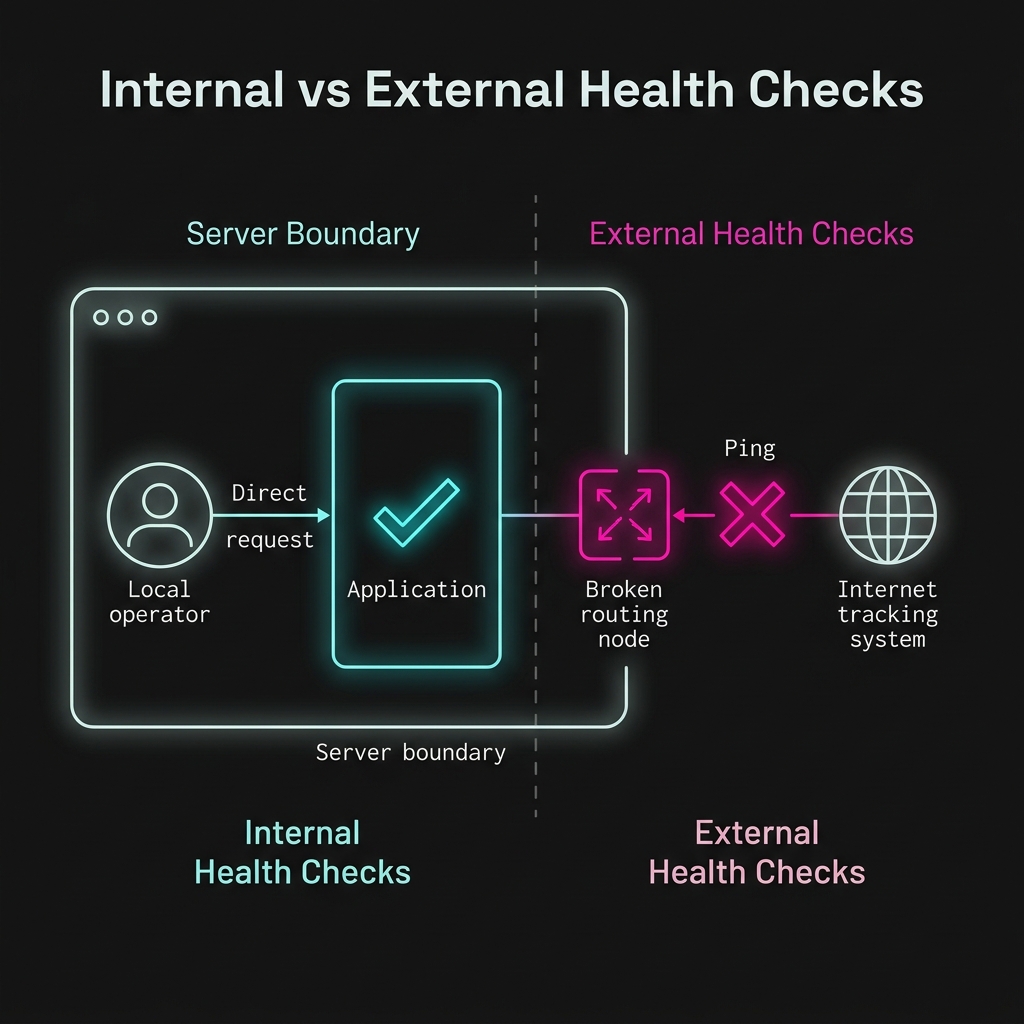
Fig 1. A local check only proves the app is properly running; an external check proves the app is actually reachable.
This route is not just useful for humans clicking around in a browser.
The main purpose of a health endpoint is to be pinged by an external system to verify the service is still up and reachable from the outside world.
Think about it: if the Node server is technically running, but Render’s routing layer crashes and inbound traffic drops, a local check (like SSHing into the box and running curl localhost:3000/api/health) might succeed, tricking you into thinking everything is fine.
But if an external service (like UptimeRobot, Render’s built-in health checks, or Datadog) pings https://voyagers-log.onrender.com/api/health from across the internet, the failing request will correctly alert you that the application is unreachable to users.
That means a small operational route like this becomes part of a much bigger platform story.
Small, predictable health signals are useful precisely because automated external systems can rely on them.
Once a hosting platform can ask an app “are you alive?” by pinging its health endpoint on a regular basis, it becomes much easier to detect dead processes and restart them automatically.
How This Fits with the Earlier Pages
Section titled “How This Fits with the Earlier Pages”So far, our visibility story has been building in layers:
- startup logs tell us the app woke up
- request logs tell us traffic is arriving
- error logs tell us what failed
- a heartbeat endpoint tells us whether the app is alive right now
That is a really nice progression.
Each signal answers a slightly different question.
And that is exactly what we want:
not one giant magical observability feature, but several small, useful signals working together.
Where This Still Leaves a Gap
Section titled “Where This Still Leaves a Gap”Even with a heartbeat route, one operational question still remains awkward:
what version of the app are we actually looking at?
If we deploy twice in one day and someone says:
- “I think the fix is live”
- “No, I’m still seeing the old behavior”
then “the app is healthy” is not enough.
We also need the app to identify itself.
That leads naturally to the next operational endpoint.
Extra Bits & Bytes
Section titled “Extra Bits & Bytes”Health Endpoint Monitoring Pattern
⏭ The Version Endpoint
Section titled “⏭ The Version Endpoint”A heartbeat tells us the app is alive. Next, we add a tiny route that tells us exactly what build or version is currently running.