Containers vs Virtual Machines
Virtual Machines: The Heavy Haulers
Section titled “Virtual Machines: The Heavy Haulers”Virtual Machines (VMs) are the traditional workhorses of infrastructure. When you spin up a VM, you aren’t just creating a space for your application—you are simulating an entirely new computer from the ground up.
A hypervisor sits on the physical server, dividing up the actual hardware (CPU, memory, disk). On top of those sliced-up resources, every single VM has to boot its own complete Guest Operating System. If you have ten Node applications running in ten VMs, you are running ten full copies of Linux, ten kernels, and ten sets of system background processes before you even execute your first line of JavaScript.
VMs offer incredibly strong isolation, making them secure and robust, but that isolation comes at a severe operational cost:
- They consume massive amounts of disk space and memory just to sustain their own OS.
- They take minutes to boot because they are literally turning on a virtual computer.
- They are heavy to move around and difficult to version control.
Containers: The Standardized Fleet
Section titled “Containers: The Standardized Fleet”Containers take a fundamentally different approach. Instead of virtualizing the hardware to run multiple operating systems, containers virtualize the operating system to run multiple applications.
They achieve this by sharing the host machine’s OS kernel. A container packages the application, its runtime (like Node), required libraries, and specific filesystem structures into a standardized unit. However, when the container runs, it communicates directly with the host kernel rather than loading its own.
This architectural shift changes the physics of deployment:
- Because there is no guest OS to boot, a container starts in milliseconds.
- They share resources fluidly, allowing you to pack far more containers onto a single server than VMs.
- They are remarkably lightweight, often weighing in at a few megabytes instead of gigabytes.
A container is not merely a “small virtual machine.” If you think of it that way, you will misuse them. A container is an isolated application process with its own filesystem and network space, designed to be ephemeral, portable, and easily replaced.
Because containers aren’t booting an entire redundant operating system, they spin up in seconds (or less) and share resources much more efficiently than a comparable fleet of VMs.
The Housing Mental Model
Section titled “The Housing Mental Model”If reading technical definitions leaves you adrift, a cleaner mental model often helps establish the distinction:
- Virtual Machine = A freestanding house. It has its own plumbing, its own electrical grid connection, its own foundation, and its own roof. If you want ten houses, you have to pour ten foundations and build ten roofs.
- Container = An apartment unit. The apartment building (the host server) provides the foundation, plumbing, and electricity (the OS kernel). Each apartment (the container) is a private, locked space with its own furniture and paint job (the application and dependencies), but they all lean on the shared infrastructure of the building.
- Image = The architectural blueprint for that apartment.
- Running Container = An occupied unit built directly from that blueprint.
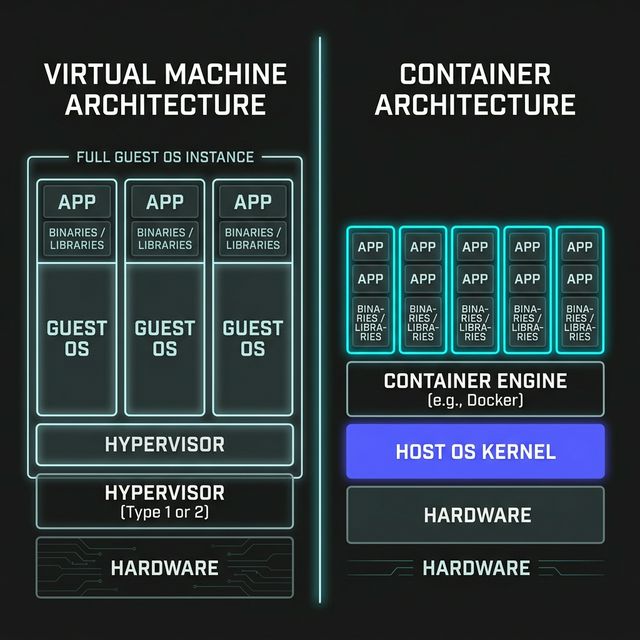
Figure 1: Virtual Machine Architecture vs Container Architecture
Extra Bits & Bytes
Section titled “Extra Bits & Bytes”What is a Container?
⏭ Solving the Node Problem
Section titled “⏭ Solving the Node Problem”The Node.js ecosystem moves fast, really fast. That can be a lot of fun, but it also means that keeping environments consistent across machines is a constant challenge. Let’s look at a simple Node app and see how containers help solve those problems.