Layer Caching
Docker Builds in Layers
Section titled “Docker Builds in Layers”Many instructions in a Dockerfile create a discrete layer.
You can think of a layer as a snapshot of the filesystem within the image at a specific point in time.
That’s where caching comes in.
Docker can reuse previously built layers from its cache if the relevant inputs (the files we are copying or the commands we are running) have not changed.
We want to put the instructions that change the least frequently at the top of the Dockerfile, and the instructions that change the most frequently at the bottom of the Dockerfile.
This way, Docker can reuse the cached layers as much as possible.
The Standard Node.js Pattern
Section titled “The Standard Node.js Pattern”Here is why we usually split up our copying into two steps:
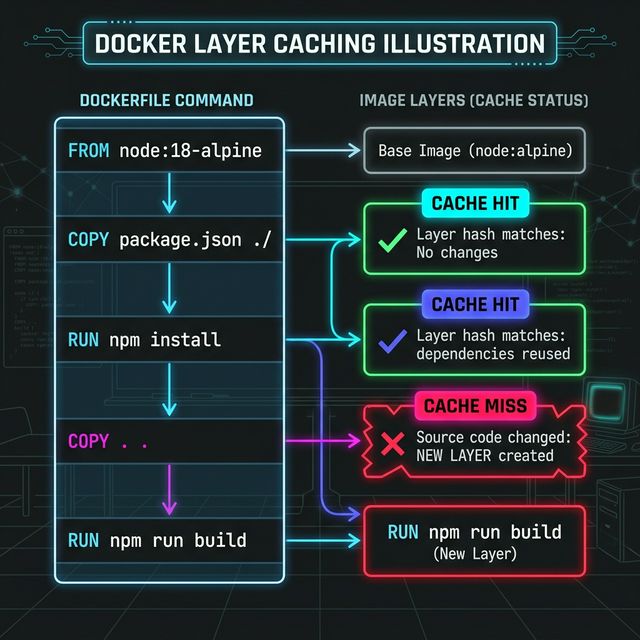
COPY package*.json ./RUN npm installCOPY . .That exact sequencing is intentional.
Why It Helps
Section titled “Why It Helps”If package.json and package-lock.json have not changed since our last build, Docker will safely reuse the cached layer where dependencies were npm installed.
Then, if we only change our application source code (e.g. server.js), the cache only invalidates at the second COPY step. Docker can skip re-running npm install entirely.
That makes our day-to-day rebuilds exponentially faster.
It’s a tiny structural choice, but it holds a very real time payoff. Good Dockerfiles are ordered from least-frequently-changed (base images, dependencies) to most-frequently-changed (source code).
The Less Helpful Version
Section titled “The Less Helpful Version”If you do this instead, it will technically work:
COPY . .RUN npm install…but it breaks the caching model.
If we copy everything first, then even a tiny modification to a minor route
file will invalidate that COPY layer. As a result, Docker has to re-run our
npm install, and every subsequent step each and every single time we make
even the slightest change to any code.
Extra Bits & Bytes
Section titled “Extra Bits & Bytes”Docker Build Caching
⏭ .dockerignore
Section titled “⏭ .dockerignore”It’s not just git that gets to ignore files. Docker does, too.