Error Logs
If there is one guarantee in software, it is this:
things break.
Databases time out. Routes throw exceptions. Dependencies misbehave. Code makes assumptions and reality laughs.
The goal is not to eliminate all failure.
The goal is to make failure understandable.
An application that crashes vaguely is frustrating. An application that fails clearly is doing the support team a favor.
Why Default Failure Is Not Good Enough
Section titled “Why Default Failure Is Not Good Enough”Left on its own, an application often fails in one of two unhelpful ways:
- it crashes with very little useful context
- it returns a generic
500while telling us almost nothing about what happened
Neither is great.
Suppose Voyagers Log tries to save a document to MongoDB and that write fails.
If we do not handle that intentionally, we may end up with:
- a confused user
- a vague server failure
- logs that do not explain enough
- a support workflow based mostly on squinting
That is exactly what we want to improve.
Catch the Failure and Add Context
Section titled “Catch the Failure and Add Context”When we know an operation is risky, we should wrap it deliberately.
A database write is a perfect example.
Right now in server/index.js, our POST /api/voyages route handles errors decently, but we can upgrade its format to match the rest of our system logs:
app.post('/api/voyages', async (req, res) => {  try {    const { voyagerName, message } = req.body;
    if (!voyagerName || !message) {      return res.status(400).json({ error: 'voyagerName and message are required' });    }
    const newLog = await Log.create({ voyagerName, message });
    res.status(201).json({ success: true, message: 'Voyage entry submitted for review', log: newLog });  } catch (error) {    const timestamp = new Date().toISOString();
    console.error(`[${timestamp}] [SYSTEM] [ERROR] Failed to create voyage entry.`);    console.error(`[${timestamp}] [SYSTEM] [REASON] ${error.message}`);
    res.status(500).json({ error: 'Failed to create voyage entry' });  }});
This changes the failure story dramatically.
Instead of “something broke somewhere,” we now know:
- when it happened
- what operation failed
- the underlying error message
That is much more useful.
The most useful error logs are not the loudest ones. They are the ones that tell you what the app was trying to do when it failed. A short, specific message is often more valuable than a huge wall of panic.
Why the Labeling Helps
Section titled “Why the Labeling Helps”Notice the use of markers like:
[SYSTEM] [ERROR][SYSTEM] [REASON]That is not just aesthetic fussiness.
Once logs get busy, consistent labels make it much easier to:
- scan quickly
- search quickly
- filter the noise
- spot failure moments in a stream of normal request activity
That kind of consistency becomes surprisingly valuable once the app has real traffic.
Tiny habit. Big payoff.
Log More for Ourselves, Less for the User
Section titled “Log More for Ourselves, Less for the User”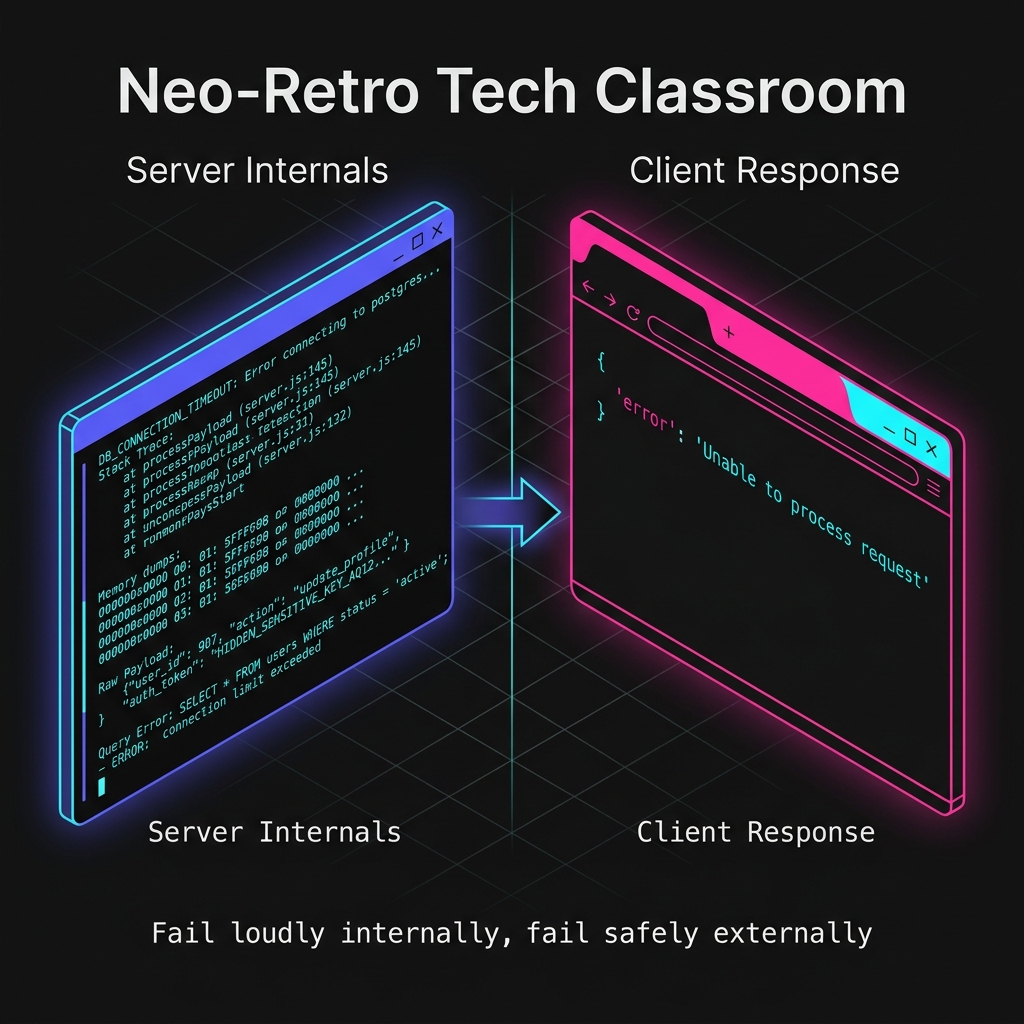
Fig 1. The Two-Faced Response: Chaos in the logs, calm in the UI.
One of the most important habits in production-aware software is understanding that:
- internal logs are for operators
- responses are for users
Those are not the same audience.
In the example above, the logs include the actual error message:
console.error(`[${timestamp}] [SYSTEM] [REASON] ${error.message}`);But the user gets a much more generic JSON response:
res.status(500).json({ error: 'Failed to create voyage entry' });That is intentional.
We want enough detail in the logs to help us debug the issue. We do not want to dump internal system details into the public interface.
Raw stack traces, database errors, and internal exception details belong in logs, not in the browser response. Helpful to us, dangerous and messy for everyone else.
What Good Error Logs Usually Include
Section titled “What Good Error Logs Usually Include”For this stage of the lesson, a useful error log usually includes:
- a timestamp
- a severity label like
[ERROR] - a short description of the failed operation
- the underlying error message
That is enough to answer questions like:
- what failed?
- when did it fail?
- what was the app trying to do?
- what clue did the underlying error give us?
That is already miles better than silence.
Where to Put Error Logs
Section titled “Where to Put Error Logs”We do not need to wrap every single line of code in dramatic defensive ritual.
But we do want intentional logging around operations that are especially likely to fail or especially important when they do fail.
Good candidates include:
- database reads and writes
- authentication logic
- external API calls
- file operations
- important startup steps
In other words: risky boundaries deserve better visibility.
That is where error logging gives the most value.
What Error Logs Still Do Not Replace
Section titled “What Error Logs Still Do Not Replace”Even good error logs do not replace everything else.
They do not replace:
- startup logs
- request logs
- health-style checks
They work alongside them.
Together, those signals let us piece together a much fuller story:
- did the app start?
- did the request arrive?
- what failed during handling?
- what was the likely reason?
That layered story is what makes an app supportable.
A Better Failure Philosophy
Section titled “A Better Failure Philosophy”A useful way to think about this is:
- failure is normal
- silent failure is the real enemy
If the application is going to fail, we want it to fail in a way that leaves a trail.
Not a giant mess. Not a public information leak. Just enough context that a human can understand what happened and take the next step intelligently.
That is operational courtesy.
And honestly, it is one of the nicest things you can do for your future self.
What Comes Next
Section titled “What Comes Next”So far, we have focused on signals produced when:
- the app starts
- traffic arrives
- something breaks
But sometimes we want to check the app’s status on purpose, without waiting for a user request or an error to trigger the clue.
That is where a small operational endpoint becomes useful.
Extra Bits & Bytes
Section titled “Extra Bits & Bytes”MDN: try…catch
⏭ The Heartbeat Endpoint
Section titled “⏭ The Heartbeat Endpoint”Sometimes we do not want to wait for an error or a user action to tell us the app is alive. Next, we add a tiny route whose only job is to answer that question directly.