Images vs Containers
Static Blueprint vs. Live Process
Section titled “Static Blueprint vs. Live Process”The distinction between an image and a container is the single most important concept in the Docker workflow.
The Image: The Packaged Truth
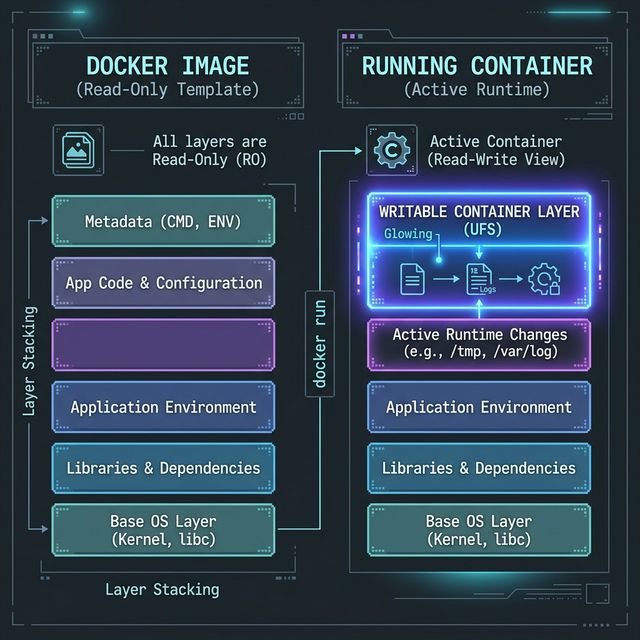
Section titled “The Image: The Packaged Truth”An image is a collection of read-only layers. It is the finished, immutable artifact that we ship. It contains the OS files, the Node runtime, and our application code.
When we talk about images, we use verbs like:
- Build: Creating the image from a Dockerfile.
- Tag: Assigning a version or name (like
v1.0.0). - Push/Pull: Moving the static file to and from a registry.
The Container: The Running Instance
Section titled “The Container: The Running Instance”A container is a live environment where our code actually executes. When we start a container, the Docker Engine takes that read-only image and adds a tiny writable layer on top of it.
This is the “magic” of Docker: we can start fifty containers from the exact same image. Each container has its own private writable layer, but they all share the same massive read-only files from the image on our disk.
When we talk about containers, we use verbs like:
- Create/Run: Spawning a new instance from an image.
- Start/Stop: Resuming or pausing the process.
- Remove: Deleting the instance and its writable layer.
- Log: Viewing the output from the running application.
Manual changes made inside a running container are lost when the container is removed. This is a feature, not a bug. It ensures that our runtime environments are always predictable and reproducible.
The Blueprint Analogy
Section titled “The Blueprint Analogy”Think of an image like a blueprint for a standardized shipping container home.
- The blueprint defines exactly where the walls are, what the wiring looks like, and what appliances are included.
- We can use that same blueprint to build a hundred identical houses.
- If a tenant paints the walls of their house (the “writable layer” of the container), the blueprint (the image) remains completely unchanged.
- If that house is demolished (the container is removed), the “paint” is gone. If you want every new house to have that paint job, you have to update the blueprint.
We build images, and we run containers.
If we remember that images are for storage and distribution and containers are for execution, the rest of the CLI commands will make much more sense.
Extra Bits & Bytes
Section titled “Extra Bits & Bytes”Docker CLI: Image Commands
Docker CLI: Container Commands
⏭ The Build Recipe
Section titled “⏭ The Build Recipe”So how do we actually define our image in code?
We use a Dockerfile.