Platform Logs as Truth
The End of “But It Works Locally”
Section titled “The End of “But It Works Locally””One of the most common reactions to a broken deploy goes like this:
- open the live URL
- see an error
- run the app locally
- watch it work
- blame the platform
Understandable.
Not useful.
Once an app is deployed, it is running in a different environment with different conditions:
- different environment variables
- a platform-provided port
- hosted networking
- a remote database
- production filesystem assumptions
- a reverse proxy sitting in front of it
So if the hosted app is failing, the first place to investigate is not your local terminal.
It is the hosted runtime logs.
Why Platform Logs Matter
Section titled “Why Platform Logs Matter”By now, we have already separated deployment failures into two major types:
- build failures
- runtime failures
When the problem is in the running application, platform logs become the most important evidence source.
Why?
Because they show the actual output of the deployed process.
That means they reveal things like:
- startup messages
- MongoDB connection failures
- uncaught exceptions
- errors triggered by real requests
- repeated restarts or crash loops
This is where the deployed version of your app speaks for itself.
A local app working correctly only proves that your local environment is healthy. It does not prove that the hosted environment has the same configuration, connectivity, or runtime behavior.
Build Logs vs Application Logs
Section titled “Build Logs vs Application Logs”Do not mash these together.
Build Logs
Section titled “Build Logs”Build logs tell the story of packaging the app:
- cloning the repo
- running Docker steps
- installing packages
- building the frontend
- assembling the image
These were the logs we focused on earlier during deployment.
Application Logs
Section titled “Application Logs”Application logs tell the story of the running app:
- starting the Node process
- connecting to Atlas
- binding to the port
- handling requests
- throwing runtime errors
Different question.
Different log stream.
If the image built successfully but the app is still failing after startup, the application logs are now the important ones.
Once the image build is over, build logs stop being the main story. If the running app is crashing or misbehaving, you need the logs from the running service.
Where to Find Them in Render
Section titled “Where to Find Them in Render”In Render:
- open your Voyager’s Log Web Service
- go to Logs
- watch the output from the running service
Think of this as the hosted version of the terminal output you normally watch locally with npm start.
Except now that terminal belongs to the deployed environment.
And that is the one that matters.
What These Logs Actually Are
Section titled “What These Logs Actually Are”This part is worth demystifying.
Render’s application logs are not some magical dashboard summary.
They are mostly just the standard output and error streams from the running process.
That means things like:
console.log()console.error()- thrown exceptions
- stack traces
- startup messages
all show up there.
So if your app contains this:
console.log(`Voyager's Log API listening on port ${PORT}`);you should expect to see it in the platform logs when startup succeeds.
And if Mongoose throws a connection error, that usually lands there too.
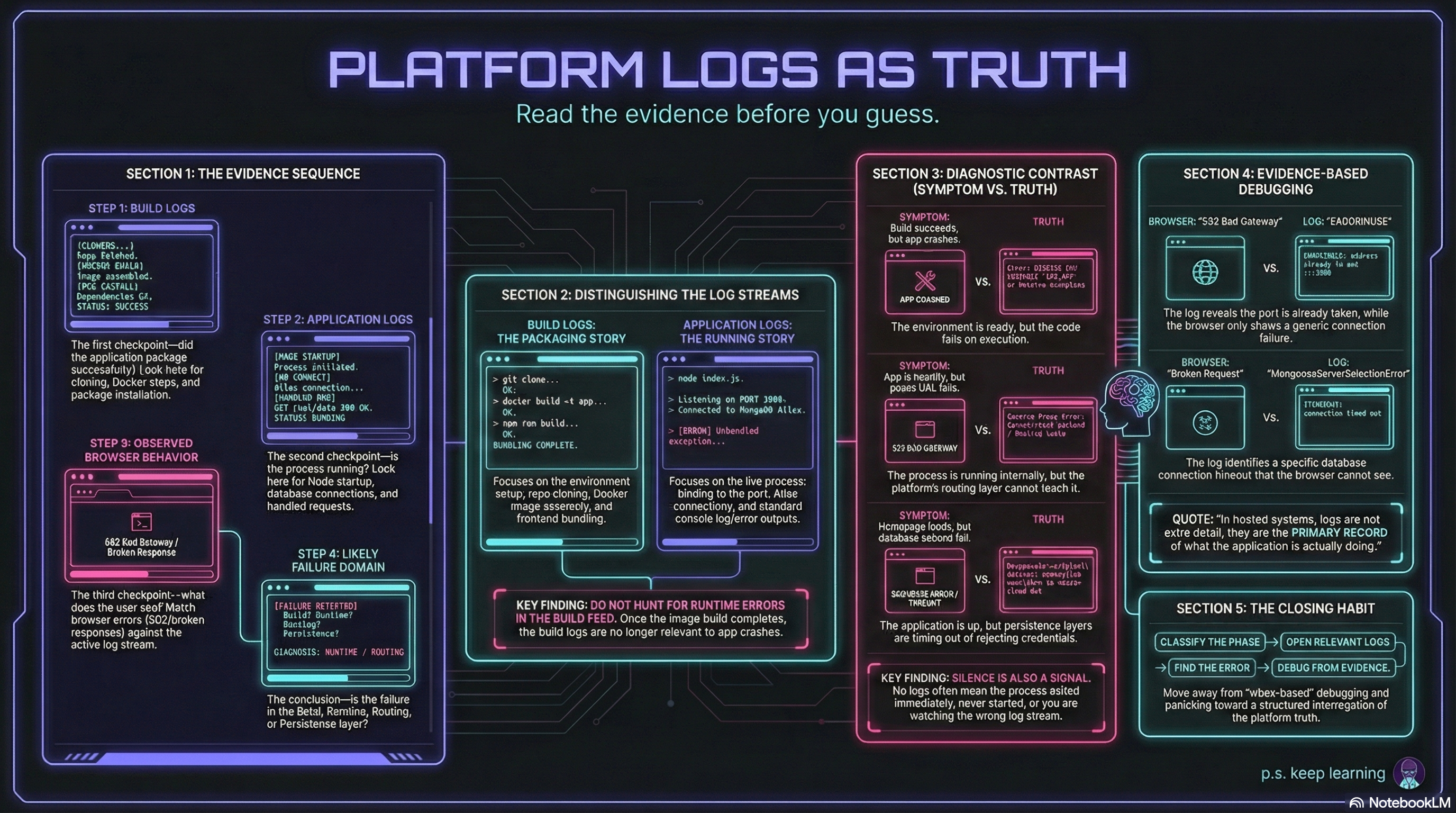
Figure 1. The Truth Is Out There - In The Logs
It Is Still Just a Terminal
Section titled “It Is Still Just a Terminal”The UI may look friendlier than a shell window, but conceptually this is still just process output from a running Node app.
The platform logs are the remote terminal you no longer have direct shell access to.
That mental model helps a lot.
What a Useful Runtime Error Looks Like
Section titled “What a Useful Runtime Error Looks Like”If the deployed app fails during startup or request handling, the logs usually tell you much more than the browser does.
A browser might only show:
502- a generic error page
- a broken request response
But the logs may show the real cause, such as:
MongooseServerSelectionError: connect ETIMEDOUTError: listen EADDRINUSETypeError: Cannot read properties of undefinedThat is why the logs matter so much.
They convert:
“the app is broken”
into:
- what failed
- where it failed
- sometimes which subsystem triggered it
That is the difference between guessing and debugging.
How to Read Them Productively
Section titled “How to Read Them Productively”Do not read platform logs like a novel.
Read them with a question in mind.
If the app never becomes healthy
Section titled “If the app never becomes healthy”Look for:
- startup logs
- connection failures
- immediate crashes
- port binding issues
If the homepage loads but form submission fails
Section titled “If the homepage loads but form submission fails”Look for:
- request-handling errors
- Atlas write failures
- route exceptions
- authentication or session problems
If login fails unexpectedly
Section titled “If login fails unexpectedly”Look for:
- Passport-related errors
- session secret problems
- database lookup failures
The goal is not to admire the logs.
The goal is to interrogate them.
What Silence Can Mean
Section titled “What Silence Can Mean”Sometimes the absence of useful logs tells you something too.
If there is no meaningful runtime output at all, that may suggest:
- the app never started properly
- the process exited immediately
- the deploy never got past build or startup
- you are looking in the wrong log stream
So silence is not “no clue.”
Silence is also a clue.
If the deployed app appears dead and the application logs show almost nothing, do not invent a frontend theory immediately. It may mean the process never started successfully or the failure happened earlier in the pipeline.
A Better Debugging Habit
Section titled “A Better Debugging Habit”When something breaks in production, the habit we want is:
- classify the failure phase
- open the relevant platform logs
- find the concrete error message
- debug from evidence, not vibes
That is much better than:
- panic
- rerun locally
- insist the cloud is haunted
- randomly edit files
Hosted debugging gets much calmer once we accept that the deployed environment has its own observable truth, and the logs are where that truth lives.
The app is deployed.
Now we know how to listen when it complains.
Extra Bits & Bytes
Section titled “Extra Bits & Bytes”The Twelve-Factor App: Logs
⏭ Architecture Review
Let’s step back, one last time, and compare the local multi-container architecture with the hosted deployment architecture.