Running the API Container
We now have an API image.
Nice.
Now let’s turn that image into a running container and see how well our two services get along without any orchestration help.
Starting the API Container
Section titled “Starting the API Container”Run this command:
docker run -d -p 3000:3000 --name api_service portfolio-apiIf all goes well, Docker will create and start a new container named api_service.
Breaking Down the Command
Section titled “Breaking Down the Command”docker runcreates and starts a container from an image-druns it in detached mode-p 3000:3000maps port 3000 on our machine to port 3000 in the container--name api_servicegives the container a predictable nameportfolio-apiis the image we built earlier
Checking That the Container Is Running
Section titled “Checking That the Container Is Running”We can confirm that the container started with:
docker psWe should see both of these containers running:
db_serviceapi_service
At least, that is the dream.
Testing the API
Section titled “Testing the API”Our app exposes a route at:
http://localhost:3000/api/projectsSo at this point, it is tempting to open that in a browser and expect victory.
We may get a response.
We may get an error.
Either way, before we celebrate, we should inspect the logs.
Looking at the Logs
Section titled “Looking at the Logs”Run:
docker logs api_serviceThis is where the interesting part shows up.
Instead of happily connecting to MongoDB, the API will likely report a connection failure.
Depending on timing and environment, the message may look a little different, but the core issue is the same: the API cannot find the database at the address we gave it.
Inside the api_service container, localhost means that container
itself.
It does not mean our laptop.
It does not mean Docker in general.
And it definitely does not mean the separate MongoDB container sitting beside it.
So when the app tries to connect to mongodb://localhost:27017/portfolio, it
is looking for MongoDB inside its own container and finding absolutely
nothing.
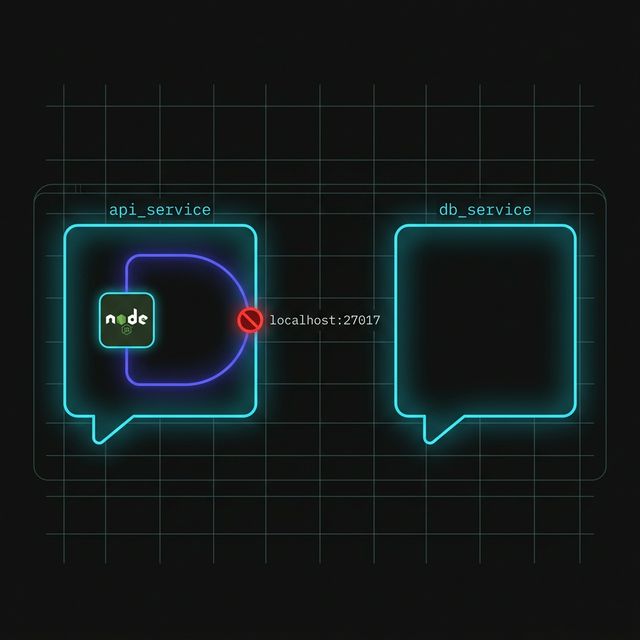
Figure 1: The Localhost Trap. Inside a container, ‘localhost’ is a self-referential loop. The API is looking for a database inside its own walls instead of reaching out to the service sitting right next to it.
Why This Failure Is Useful
Section titled “Why This Failure Is Useful”This is not a random bug.
This is the lesson.
We now have two separate containers:
- one running MongoDB
- one running our Node API
But simply having both containers running does not mean they automatically know how to talk to each other.
That wiring still has to happen.
This is exactly the kind of failure we want right now.
The API container starts. The database container starts. But the connection between them is missing.
That makes the real problem much easier to see.
Where We Are Now
Section titled “Where We Are Now”At this point, we have proven that:
- the database can run in one container
- the API can run in another container
- the API cannot reach MongoDB just by using
localhost
And that sets us up perfectly for the next step.
Extra Bits & Bytes
Section titled “Extra Bits & Bytes”Docker Port Publishing
⏭ Manual Orchestration
Section titled “⏭ Manual Orchestration”Our two services are alive, but they are not cooperating yet. Next, we’ll wire them together the hard way so we can feel exactly what Docker Compose is going to save us from.