Verifying External Routing
The Public URL Is the Real Test
Section titled “The Public URL Is the Real Test”A healthy status in Render is a good sign.
But it is not the final proof.
A service can start successfully, bind to a port, and still fail to serve the actual application properly in a real browser. That is why this page is simple:
open the public URL and see what the hosted app actually delivers.
What We Are Verifying
Section titled “What We Are Verifying”At this stage, we are not testing the full workflow yet.
We are only verifying the hosted routing and static delivery story.
Specifically, we want to confirm that:
- the public request reaches the deployed service
- Express serves the built frontend assets
- the browser receives the compiled Vite app
- the production routing path works the way we intended it to
That may sound modest. It is not.
If this layer fails, everything after it is noise.
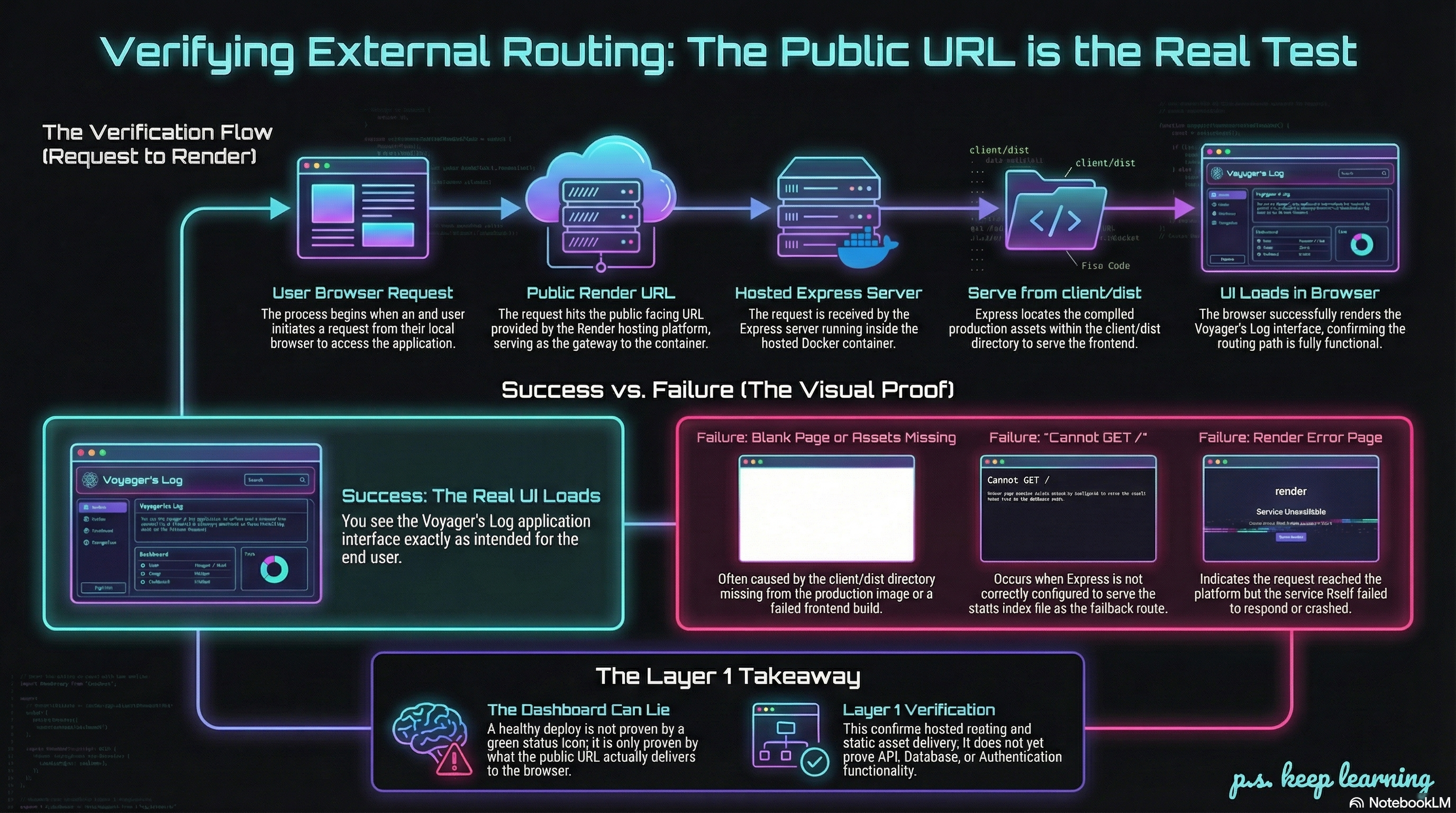
Figure 1. External Routing Verification Flow
Open the Render URL
Section titled “Open the Render URL”In your Render Web Service, open the public URL for Voyager’s Log in a browser.
That is our first real end-user view of the deployment.
We are no longer checking Docker logs or startup logs.
We are checking what a browser actually gets back from the hosted application.
What Success Looks Like
Section titled “What Success Looks Like”If the deployment is wired correctly, visiting the public URL should load the Voyager’s Log interface.
You want to see the actual UI, not:
- a Render error page
- an Express error
- a
404 - raw JSON from an API route
- a blank page with broken assets
If the interface loads, that tells us something important:
- the frontend build completed
client/distexists in the production image- Express is serving the compiled frontend assets
- the hosted route is reaching the correct container
That is a real checkpoint.
In local development, the frontend was served by Vite.
In deployment, Vite is gone as a dev server. The browser is now receiving compiled frontend assets from Express inside the hosted container.
What the Rendered UI Actually Proves
Section titled “What the Rendered UI Actually Proves”If the homepage loads, here is what that strongly suggests:
1) The frontend build succeeded
Section titled “1) The frontend build succeeded”The UI would not exist unless the Docker build successfully produced the frontend assets.
2) NODE_ENV=production is working
Section titled “2) NODE_ENV=production is working”Our server only serves the built frontend in production mode.
3) Static file serving is working
Section titled “3) Static file serving is working”The request reached Express, and Express served the compiled app instead of falling through into the wrong route path.
That is the production-serving path we were aiming for.
What This Does Not Prove Yet
Section titled “What This Does Not Prove Yet”A working homepage is encouraging, but it does not automatically prove that:
- the API routes are behaving correctly
- the app can read from Atlas
- the app can write to Atlas
- form submissions work
- admin authentication works
- moderation works
This page only proves that the hosted routing and static asset delivery are working.
That is important.
It is just not the whole stack yet.
Plenty of deployed apps load the frontend perfectly and then break the moment a user submits a form or triggers an API request.
Static delivery and application behavior are related, but they are not the same thing.
Test in Layers
Section titled “Test in Layers”This page is the Layer 1 checkpoint in the hosted verification flow:
- Layer 1: Can the hosted service serve the frontend correctly?
- Layer 2: Can the frontend talk to the backend correctly?
- Layer 3: Can the backend talk to Atlas correctly?
- Layer 4: Does the full workflow behave correctly end to end?
Right now, we stay in Layer 1.
That discipline matters.
Common Failure Shapes at This Stage
Section titled “Common Failure Shapes at This Stage”If the public URL does not load the expected UI, the likely causes are usually things like:
- the frontend build did not complete
client/distis missing from the imageNODE_ENVis not set toproduction- Express is not serving the static files correctly
- the browser is requesting assets from paths the hosted app is not serving correctly
Notice what is not on that list:
- broken moderation logic
- failed Atlas writes
- admin workflow bugs
Those belong later.
The Correct Mental Model
Section titled “The Correct Mental Model”At this point, the hosted browser flow should look like this:
- the user visits the public Render URL
- the request reaches the Render-hosted container
- Express handles the request
- Express serves the built frontend from
client/dist - the browser renders the Voyager’s Log UI
We’ve come a long way from local development.
Now the hosted app is standing on its own.
This is still not the whole deployment story, but it is a crucial piece of it.
Extra Bits & Bytes
Section titled “Extra Bits & Bytes”Express Docs: Serving Static Files
⏭ Verifying Distributed Persistence
The hosted frontend is loading. Next, we test whether the deployed app can actually send and retrieve real data through the live stack and into MongoDB Atlas.