Dockerfile it
We already met the Dockerfile in the previous lesson, so this page is more of a refresher than a grand reveal.
Now we are applying that same pattern to a small Node/Express API.
The Dockerfile
Section titled “The Dockerfile”Create a file named Dockerfile in our API folder:
FROM node:20-slimWORKDIR /appCOPY package*.json ./RUN npm installCOPY . .EXPOSE 3000CMD ["node", "server.js"]A Quick Refresher
Section titled “A Quick Refresher”This should look familiar.
Each instruction plays a specific role:
FROM node:20-slimstarts from a Node.js base imageWORKDIR /appsets the working directory inside the containerCOPY package*.json ./copies the package files firstRUN npm installinstalls the app dependenciesCOPY . .copies the rest of the application filesEXPOSE 3000documents the port the app listens onCMD ["node", "server.js"]tells the container what to run when it starts
The Dockerfile itself is not doing anything wildly new here.
What changes is the context: instead of containerizing a tiny one-off demo, we are now packaging a service that will become part of a multi-container setup.
Why Copy package.json First?
Section titled “Why Copy package.json First?”We may remember this little optimization from last class.
We copy the package files before the rest of the app so Docker can cache the dependency installation layer more effectively.
That means if we change server.js but do not change our dependencies, Docker may be able to reuse the existing npm install layer instead of reinstalling everything.
Small move. Nice payoff.
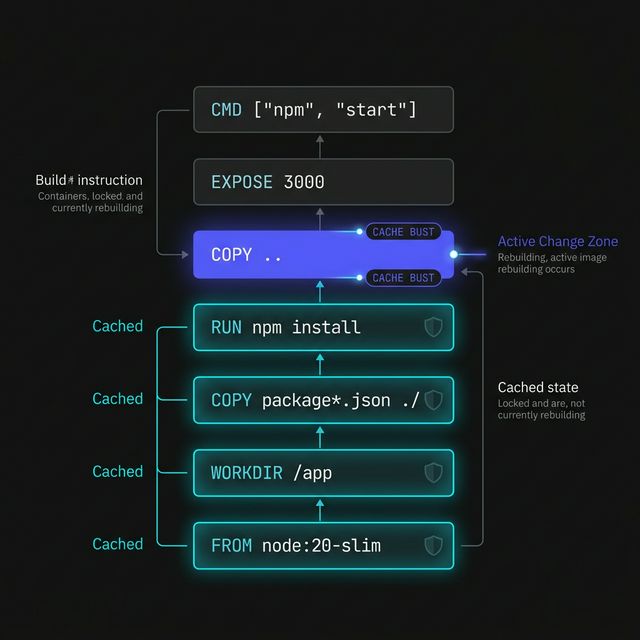
Figure 1: The Docker layer stack. By placing dependency installation before application code, we allow Docker to reuse the ‘Cached’ layers, drastically speeding up subsequent builds.
Why node:20-slim?
Section titled “Why node:20-slim?”For this lesson, node:20-slim is a solid choice because it gives us:
- a current Node runtime
- a smaller image than the full Node base image
- enough simplicity for classroom use
We are not trying to optimize every byte right now. We just want a clean, sensible base image for our API service.
This is not the moment to go spelunking through twenty different Node image variants trying to shave off every possible megabyte.
For class, clarity and reliability win.
The Main Idea
Section titled “The Main Idea”The Dockerfile is the blueprint that turns our API folder into something Docker can build into an image.
Without it, Docker has no recipe.
With it, we can package our Node app into a portable, repeatable unit that can run the same way on different machines.
That is the part that matters.
Extra Bits & Bytes
Section titled “Extra Bits & Bytes”Dockerfile Overview
⏭ Building the API Image
Section titled “⏭ Building the API Image”Now that the blueprint is in place, let’s build the image and turn these files into something Docker can actually run.