When Logs Start Piling Up
By now, we have made the case for logging.
Good logs help us answer questions. They help us understand startup, traffic, and failure. They make a live application much less mysterious.
But logs have a downside too:
they accumulate.
And if nobody thinks about that accumulation, logs can quietly become their own problem.
Logging Has Weight
Section titled “Logging Has Weight”It is easy to think of logs as harmless little text lines.
One startup message here. A request line there. A few error messages when something goes sideways.
No big deal.
Except those lines never really stop.
If an app receives steady traffic, the total grows fast.
Even modest request volume can turn into thousands or tens of thousands of log entries in a short time. Over days, weeks, and months, that adds up.
The result is simple:
- more storage consumed
- more noise to sift through
- more history to manage
- more operational baggage created by the very system meant to improve visibility
That is the tradeoff.
Logging is useful. Logging forever without limits is not.
Logs are not free. They consume storage, attention, and infrastructure. If you keep everything forever without a plan, your visibility layer can start creating its own operational mess.
What Happens If You Ignore It
Section titled “What Happens If You Ignore It”In a naïve setup, people sometimes write logs directly to a file and then just… keep going.
That file keeps growing.
And growing.
And growing.
If the environment is self-managed and storage is limited, eventually the log file can become large enough to cause real trouble.
That can mean things like:
- disk space running low
- performance getting worse
- debugging becoming harder because the useful signal is buried in endless noise
- the host or container running out of room for things that matter more
That is the basic lesson:
unmanaged logs behave like unchecked accumulation.
Maybe not dramatic on day one. Definitely annoying later.
The Two Basic Strategies
Section titled “The Two Basic Strategies”In practice, there are two broad ways people deal with log growth.
1. Log Rotation
Section titled “1. Log Rotation”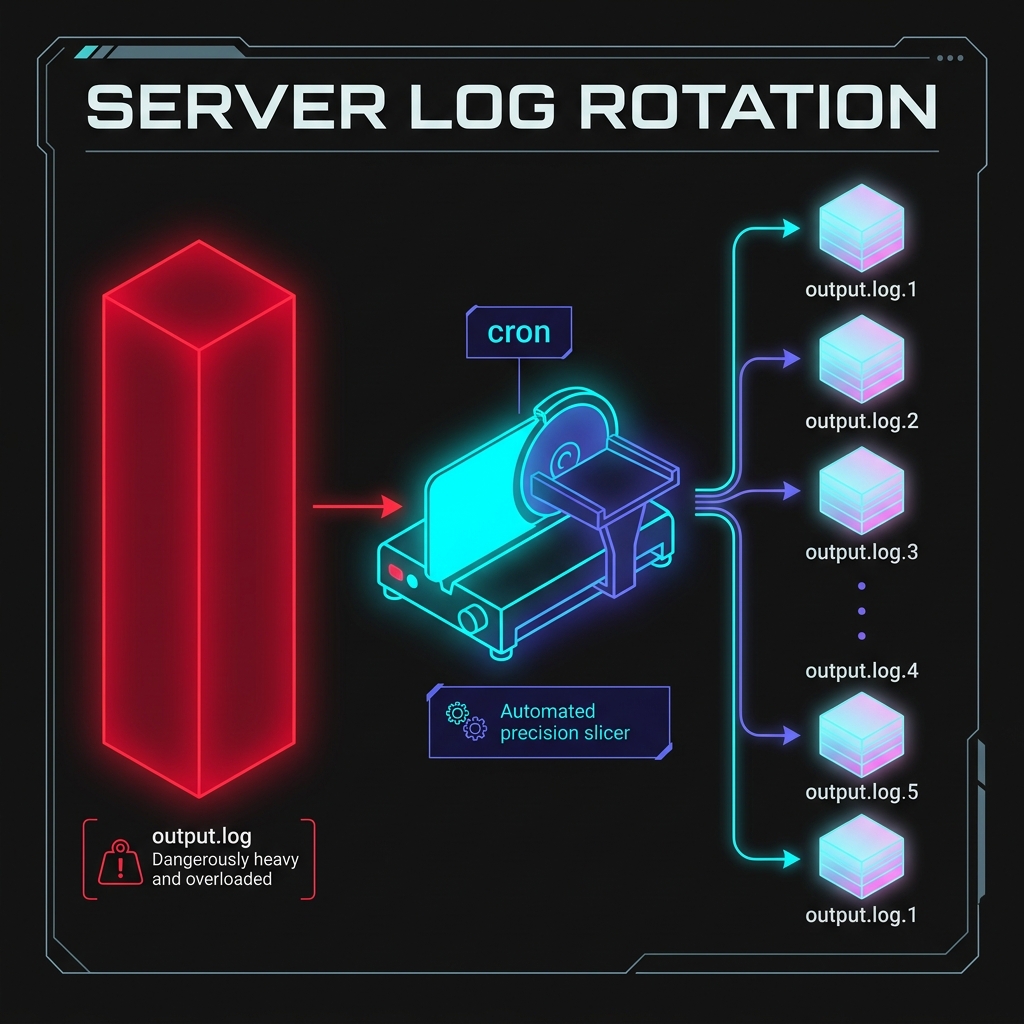
Fig 1. Rotation solves accumulation by turning monolithic unstructured text into organized daily archives.
Log rotation means:
- write logs to a file for a while
- periodically copy that file into an archive
- clear the active file so it starts fresh
- eventually delete old archives according to retention rules
This keeps any one log file from growing forever.
If we were managing our own server, we might write a simple Node script like this to copy our hypothetical app.log file. We could then schedule this script to run automatically every night at midnight using a system cron job:
const fs = require('fs');const path = require('path');
const logPath = path.join(__dirname, 'app.log');
// Only rotate if the log file actually existsif (fs.existsSync(logPath)) {  const dateStr = new Date().toISOString().split('T')[0]; // e.g. 2026-04-09  const archivePath = path.join(__dirname, `app-${dateStr}.log`);
  // Copy the active log to the archive file  fs.copyFileSync(logPath, archivePath);
  // Truncate (empty) the active log file so it starts fresh  fs.truncateSync(logPath, 0);
  console.log(`[SYSTEM] Rotated logs to ${archivePath}`);}
Once you have daily rotation working, a common next step is compression. You would not necessarily need a new tool—the same script (or a separate weekly task) could easily be expanded to take last week’s daily archived logs and compress them into .zip or .gz batches to radically reduce disk usage.
You do not need to become a Linux wizard for this course. You just need to understand the operational principle:
logs need lifecycle management too.
2. Centralized Logging
Section titled “2. Centralized Logging”In many modern hosted environments, the application does not manage local log files directly at all.
Instead, the platform captures standard output from the running process and moves those logs into a managed logging system.
That is often what platforms like Render are doing for us behind the scenes.
The app writes:
console.logconsole.error
and the platform handles:
- storage
- streaming
- retention
- presentation
That is much more convenient than manually babysitting log files on a server.
In a managed platform workflow, writing to standard output is often exactly the right thing to do. The platform captures those messages and turns them into searchable service logs without us having to manage local log files directly.
Why This Matters Even If Render Helps
Section titled “Why This Matters Even If Render Helps”Because yes, Render and similar platforms do a lot of the heavy lifting for us.
That is great.
But the underlying lesson still matters.
Even when the platform handles the storage details, log volume still affects:
- how readable your logs are
- how easy it is to spot important events
- how expensive log-heavy systems become in larger environments
- how much useful history you can realistically work with
So the takeaway is not:
- “the platform handles it, so who cares?”
The takeaway is:
- “the platform helps, but we should still log intentionally.”
That means:
- log what is useful
- avoid flooding the stream with junk
- prefer concise, meaningful signals over noisy panic chatter
Good Logging Is Not Endless Logging
Section titled “Good Logging Is Not Endless Logging”A mature logging mindset is not “log everything forever.”
It is closer to:
- log enough to understand the system
- log clearly enough to search and read
- log carefully enough not to leak sensitive data
- log intentionally enough that the signal stays useful over time
That is a much healthier goal.
The point of logging is to increase clarity.
If the logs become so massive or noisy that nobody can use them, then the visibility system starts defeating itself.
Logs that are noisy, repetitive, or oversized do not just waste storage. They also make it harder to find the meaningful events when something actually goes wrong.
The Lesson at the Right Scale
Section titled “The Lesson at the Right Scale”For this course, we do not need to dive into:
- Linux
logrotateconfiguration files - retention policy by compliance tier
- enterprise log shipping pipelines
- distributed log aggregation architecture
That is a whole other rabbit hole.
What we do need is the core operational idea:
logs are valuable, but they must be managed.
That idea is enough to help students avoid the very beginner trap of thinking that more logs is always better.
Sometimes more logs is just… more logs.
Where This Leads Next
Section titled “Where This Leads Next”Logs are great at telling stories after events happen.
They help us answer questions like:
- what happened?
- when did it happen?
- what failed?
- what route was hit?
But once we zoom out a bit, a new question appears:
are logs alone the fastest way to understand whether the system is healthy right now?
Not always.
That is where we need to distinguish between:
- logs as event history
- monitoring as system-state awareness
That is our next step.
Extra Bits & Bytes
Section titled “Extra Bits & Bytes”Linux logrotate
⏭ Logs vs Monitoring
Section titled “⏭ Logs vs Monitoring”Logs tell the story of what happened. Monitoring helps answer whether the system is healthy right now. Next, we separate those two ideas clearly.